
Showing posts with label USB. Show all posts

TOP 5 SMALL ANTIVIRUS FOR USB FLASH DRIVES

0 comments


USB Flash Drives play the biggest role in transferring viruses from one computer to another. This is really annoying and we all face this when we move data through flash drives. The famous autorun.inf  virus is the one that is usually found in flash drives which is executed as soon as it’s attached and opened. This type of virus is not harmful but annoying as it copies itself to all permanent drives of a system.

Even after tight security through Antivirus Software this nifty little virus manages to enter most of the time without being detected. But there’s a solution for this – dedicated application to monitor and stop these flash drive viruses in real time.
The list below is of 5 best of those small antivirus applications which are specially developed to stop any type of USB worms. All of these are light weight, automatic and can be run in parallel with standard and full antivirus and do not slow down your computer at all.

Naevius USB Antivirus 2.1
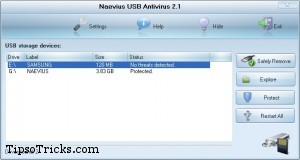
A very popular and small antivirus. Naevius USB Antivirus is a tool which protects all your your pen drive from autorun-viruses. Takes a very little space in memory and scans the drives in real time.
Download

TrustPort U3 Antivirus 2010 5.0

TrustPort U3 Antivirus is designed specifically for the protection of U3 smart drives. When installed on the U3 smart drive, it continuously monitors files being copied to the drive, so that no malicious codes can be stored on it. On-access protection is further supplemented with on-demand scanning.
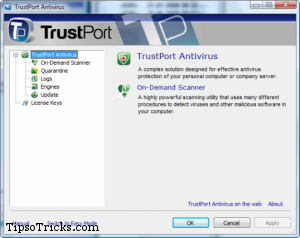
The user can scan files, folders or drives on the host computer. If an infected file is found, it will be handled according to user settings. It can be renamed, moved to quarantine or deleted. To ensure the highest level of security, the software udergoes regular updates from the internet.
Download

USB Flashdrive Autorun Antivirus 1.0

USB Flash Drive Autorun Antivirus automatically detects, closes and deletes the virus from your drive. The software provides future protection by immunizing the system; by installing special autorun file which virus can’t delete. 
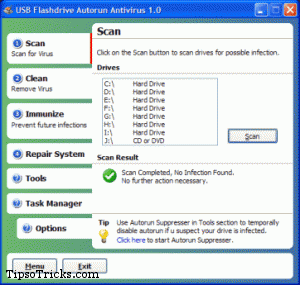
Comes with multiple inbuilt tools like Task Manager to manage running programs, Autorun Suppressor to temporarily disable autorun while inserting the drive and System repair feature to repair system functions broken by a virus. It doesn’t require any signature updates so it is perfect for offline computers.
Download

USB Drive Antivirus 3.0


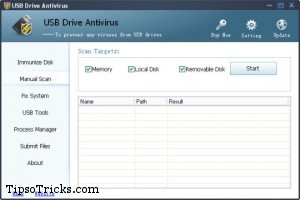
USB Drive Antivirus provides 100% protection which scans automatically, block and delete USB virus, trojans, and malicious code. It also works for Memory cards.
Download

USB Drive Antivirus
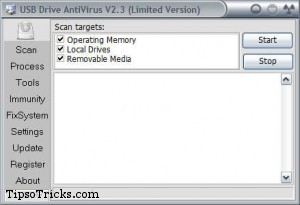
Another very popular but not so user friendly of all. But detects malicious files at good speed. Scanning options are not limited to USB drives – you can scan hard drives too.
Download

Read More »

How To Remove Short Cut Virus And Its Errors In Pendrive (or) Computer

0 comments


Short cut virus is a virus in a computer which creates shortcuts and irks us a lot.This virus spreads from one computer to the other through pendrives and harddisks. So,better check for short cut viruses before you open a pen drive or harddisk.What if you are infected with short cut virus? No problem,Today we are going to provide you a trick to remove short cut viruses and its errors from your computer.

What Are Short cut Viruses Errors?


Short cut viruses normally leads to a major errors like deleting the data or poping up a promt boxes(unlimited).These prompt boxes will not be closed even after we hit the close button and these will trouble us a lot.


How To Remove Short Cut Virus Using Short Cut Virus Remover ?


1. Download short cut virus remover tool from here

2. Just put it in some safe folder.Local disk is most suggested because,it has less scope of getting short cut virus

3. If your pendrive has short cut virus,then connect your pendrive to computer.

4. Then just copy the short cut virus removal tool and paste it in the pendrive (Removable disk)

Note:- Just copy the file only.Never cut (or) move your file to the removable disk because,this file can be copied as many times as you can and if you cut that it will be the end.


5. Open the pasted file in your remove disk.

6. Run the program and follow the instructions displayed on the screen

7. Press any key to continue (Any keyboard key to continue)


Then automatically the program runs and searches for short cut viruses.After that,it will remove it and the whole process is automated and no need of any technical knowledge or skills.After removing,it automatically closes down,now check out and you don't find short cut virus in your pendrive.

Yippee..You have removed short cut virus from your pendrive using short cut virus remover.

This trick works well with mobile memory cards,pendrives and laptop folders.Moreover,we have tested in all of them before posting this trick.

        Also Read:- How To Set Pattern Lock For Your Computer


How To Remove Short Cut Virus Errors?


Short cut virus errors include unlimited prompt boxes.It makes you frustated so,here is the trick to remove unlimited prompt boxes.

Unlimited prompt boxes will occur only when we open the virus folders.Here you might have question on how to find the spam/virus folders.It is easy to find the spam folders if you use some knowledge (or) intelligence

The folders which appears below the removable disk shortcut folder are called virus folders and the folders which contain names like photos,videos,music may also contain virus.Never open the folders containing some casual (or) most used names,if you open then you will get the unlimited prompt boxes problem

Here,we are providing you a solution to remove unlimited prompt boxes.

1. Open "task manager" (or) hold "ctrl+alt+del" and click on processes tab

2. Now search for the folder which you opened and click on "end process" button

That's it you are saved from the irking pop up's.Hope you liked this trick and we will be very much happy if you socialise this trick by sharing it on any social media using buttons....


Read More »